CareerPrepped offers a job tracker tool so every user can save jobs to track their job search progress in one place. The tool provides a labeling system so students can indicate the status of every saved job (Closed, Saved, Applied, Interviewed, Offered, No Response, Rejected). It also lets users document contact information if they have spoken with someone about the job and notes to remember key information and keep their job search organized. All of this is valuable information when coaching and advising students to assist them in their job search.
To see students' saved jobs:
1. Sign in to CareerPrepped
2. Click your name/avatar in the upper right corner and select "Admin Panel" from the drop-down menu
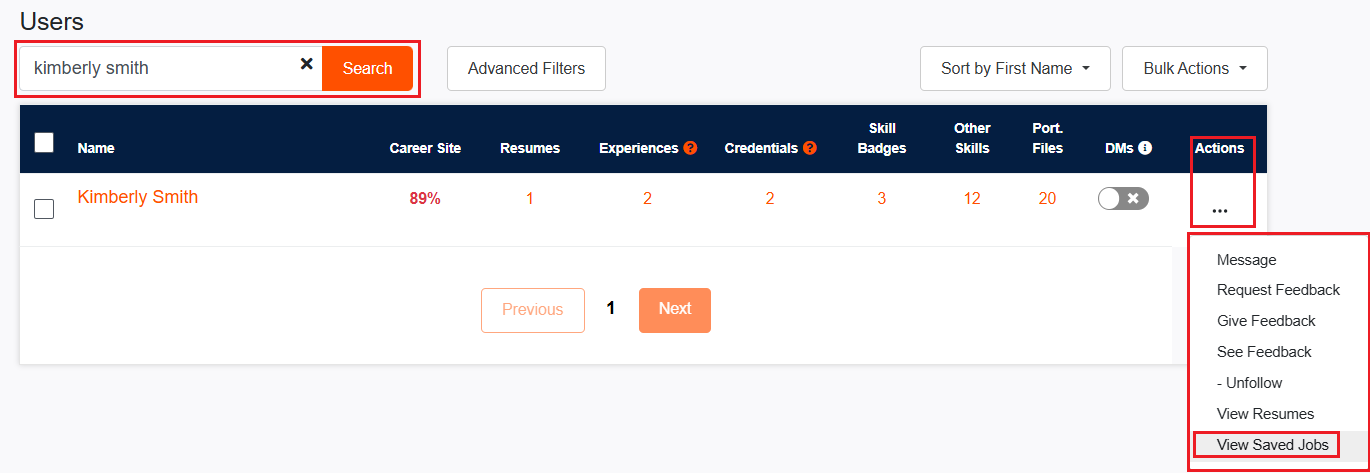
3. Locate the student in the user table of the dashboard
4. Click the "Actions" button corresponding to the student
5. Select "View Saved Jobs" from the drop-down menu. Click on any saved job to see notes.
Accessing your students' saved jobs allows you to monitor their progress in the job search journey. By reviewing their saved positions and notes, you gain insights into their interests, application activity, and any challenges they may encounter. This feature empowers you to offer personalized guidance, track their job search efforts effectively, and provide timely support to help them succeed in their job search.