

You have a few different ways to see what skills your students have claimed and how they are evidencing them.
Method 1: View Skills in Your Students' Claimed Skills Dashboard
Sign in to CareerPrepped
Click your name/avatar in the upper right corner to reveal the drop-down menu
Click on "Admin Panel"
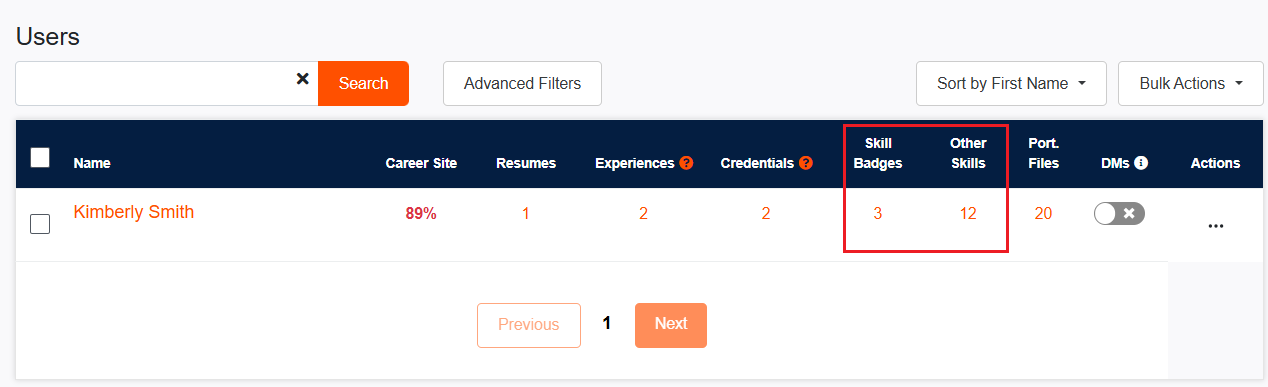
Locate your student in the User Table
Click on the number corresponding with their "Skill Badges" or "Other Skills"
Result: You will visit the student's claimed skills page and can toggle between their claimed "Skill Badges" and "Other Skills" tabs to view their entire skills inventory. Clicking on any skill in card view will take you to the skills' evidence page.
Questions to Ask Yourself When Reviewing Students' Skills Dashboard:
Skills Inventory:
Are students actively cataloging their skills?
Does your institution have a system in place to ensure proper documentation and evidence of student skills, not just grades and courses completed?
Competitive Skill Showcase:
Do students demonstrate the ability to identify their skills, provide evidence, and effectively showcase them to compete in the job market?
Program Skills Alignment:
Are students documenting the skills expected from their program of study?
If not aligned, are students aware of these skills and what they are called?Does the institution explicitly name these skills using language derived from labor market information? (Note: CareerPrepped's skills database is powered by Lightcast skills, based on labor market information.)
Method 2: View Students' Career Site
Sign in to CareerPrepped
Click your name/avatar in the upper right corner to reveal the drop-down menu
Click on "Admin Panel"
Locate your student in the User Table
Click on the student's name
Result: You can review a student's Career Site to see their claimed skills and Skill Badges. Keep in mind that students can set privacy settings to hide Skill Badges and evidence pages of their claimed skills until they choose to showcase them. Skills displayed in navy do not have a clickable link to the evidence page. Only Admins with access to CareerPrepped's Organizational Account can use the "show hidden skills" or "show hidden Badges" feature to view content that students have hidden. Admins with a sponsored "Educator Account" (limited features) do not have access to this feature.