

Periodically reviewing student Career Sites is a great way to ensure they’re making progress and staying on track to launch their careers. CareerPrepped makes it easy for admins to view these sites and use them as a foundation for powerful, skill-focused coaching conversations.
Step-by-Step: How to Access Student Career Sites
Log in to CareerPrepped
Click your name/avatar in the upper right corner, then click "Admin Panel."
Find students by clicking the group they're in and locate them in the user table. You can also use the search bar to locate the student(s) you want to review.
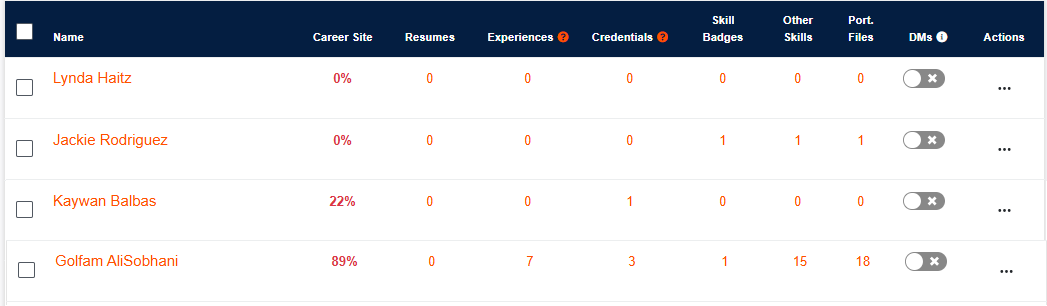
In the user table, you’ll see key progress indicators including Career Site completion percentage.
To go deeper, simply click the student’s name—this opens their Career Site in a new tab.
What to Look for When Reviewing a Career Site
When viewing a student's Career Site, here are key elements to evaluate to understand their readiness and plan appropriate support:
✅ Career Site Completion
Is their site partially or mostly complete?
Are they just starting (0–25%), making progress (25–75%), or nearly ready to launch (75–100%)?
Use the percentage bar in the user table as a quick reference before diving in.
✅ "About Me" Section
Is it filled out with a clear, personalized summary?
Does it highlight the student’s career interests, strengths, and goals?
Look for vague or overly generic text—it’s a great coaching moment to help them define their voice.
✅ Skill Badges and Other Skills
What skills have they claimed?
Are they supported with evidence (portfolio files, endorsements, testimonials)?
Encourage students to link real-world proof and seek feedback or validation for their claims.
✅ Portfolio Files
Are there any uploaded work samples, certifications, photos, or videos?
Do the files connect to specific skills?
Use this to coach them on how to tell a more complete career story with evidence.
✅ Experience Section
Have they documented jobs, internships, volunteering, or other activities?
Help them articulate their skills and achievements in a results-oriented way.
✅ Credentials
Have they listed earned credentials, certificates, or licenses?
Are their credentials named correctly or missing key details?
✅ Gaps or Inconsistencies
Is there a mismatch between what they’ve claimed and what’s supported?
Are there areas they’ve left blank that you know they’ve completed (based on classroom or program work)?
Next Step: Use Career Site Reviews for Coaching
Once you’ve reviewed a student’s Career Site, you can schedule a quick check-in or written message. Here are examples of supportive conversation starters:
“I saw you claimed teamwork—can you show me how you’ve demonstrated that recently?”
“Your portfolio looks great. Want help deciding which files are strongest to show evidence of your skills?”
“Let’s review your About Me section together to help you sound more confident and focused.”
These reviews not only prepare students for real opportunities—they deepen your ability to guide them meaningfully.